This blog is part of the Architecting a System series, where we are breaking down what all goes behind designing and building a system.
The previous part covered buffers, events and streaming — queues, pub-sub, logs, Kafka, and what happens when producers outpace consumers.
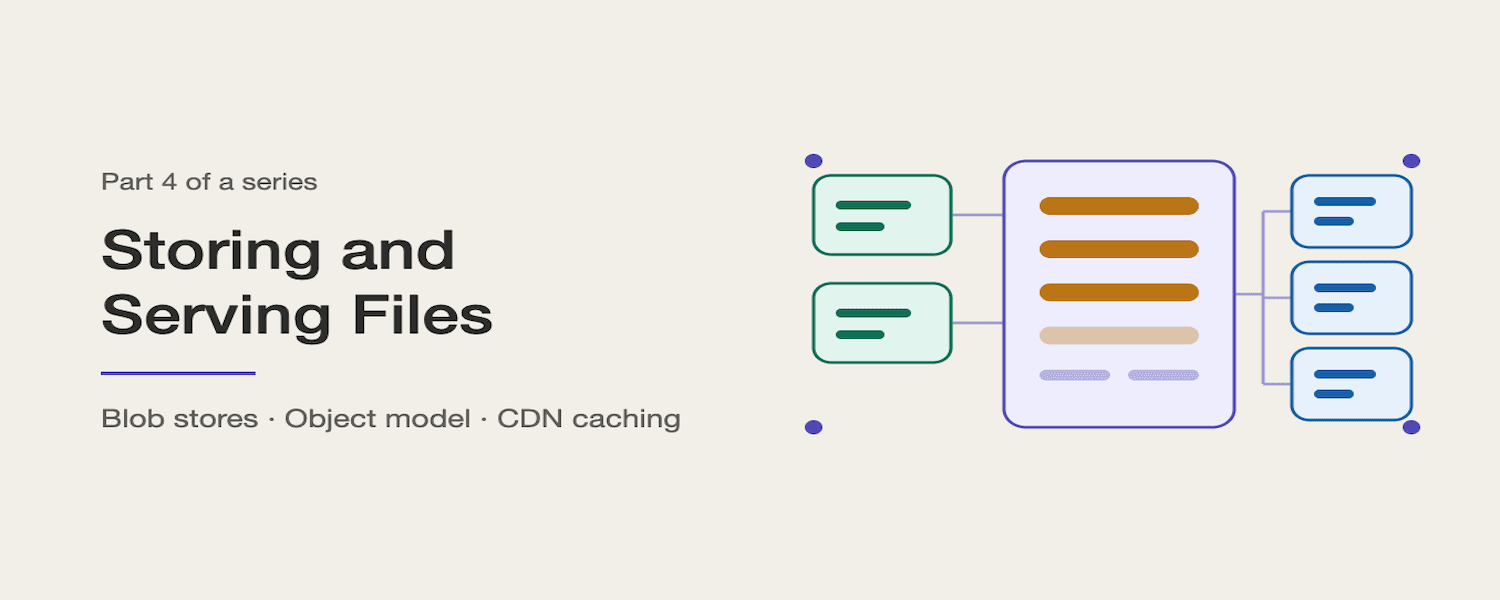
In this part, we look at the large things those systems refuse to carry. We will cover blob stores, how objects actually behave, getting bytes in and out, file formats, static site hosting, and CDNs.
Introduction
The previous part ended on a deferral. A message broker caps how large a message can be, so when the payload is a 40 MB CSV you put the file in a blob store and put the key in the message.
That simple pattern means a lot of things. The blob store is now holding your data, which means it impacts consistency, cost, and access control. And once the file is stored, you usually have to serve it, which brings in caching. Caching is where many of the practical problems show up.
So this part works forward from the bucket. What an object is and how it differs from a file, how bytes get in and out without going through your servers, what your choice of format decides about read cost, and how a CDN serves the result — including the ways a CDN quietly serves the wrong thing.
Why Files Do Not Live in Your Database
Row size limits put a ceiling on file bytes in a column immediately. Backups and restores now move your file bytes along with your business data, so a restore that took four minutes takes an hour. Replication carries the same weight to every replica. And your database connections are a bounded, expensive pool, so every download is holding one of them for the duration of a transfer.
Then there is the delivery problem. To send a 40 MB row to a browser, the bytes have to come out of the database, into your application, and out again over HTTP. Your application server has become a file server, and it is a worse one than a file server.
A few kilobytes in a column is okay. A small avatar, a signed receipt, an icon — storing those inline is fine, and often simpler than the alternative, because none of the above bite at that size. But when the blobs are large enough, or numerous enough, to dominate the table, that’s where a blob store comes in. It takes bytes at a key, keeps them durably, and gives them back over HTTP.
In practice, those blobs are your files:
- Images
- PDFs
- CSVs
- Parquet files
- Videos
- Logs
- Exports
- Other forms of unstructured or semi-structured data
Common examples include the following, of which MinIO is the one you can self-host, since it exposes an S3-compatible API:
- AWS S3
- Google Cloud Storage
- Azure Blob Storage
- MinIO
The Object Model
Blob stores look enough like a filesystem that people assume the rest of the resemblance holds. But that’s not the case.
There Are No Directories
An object has a key, some bytes, and metadata. The key is one flat string.
2026/08/reports/regional-sales.csvThere is no 2026 directory and no reports directory. There is one key that happens to contain slashes, and the console and CLI display those prefixes as folders.
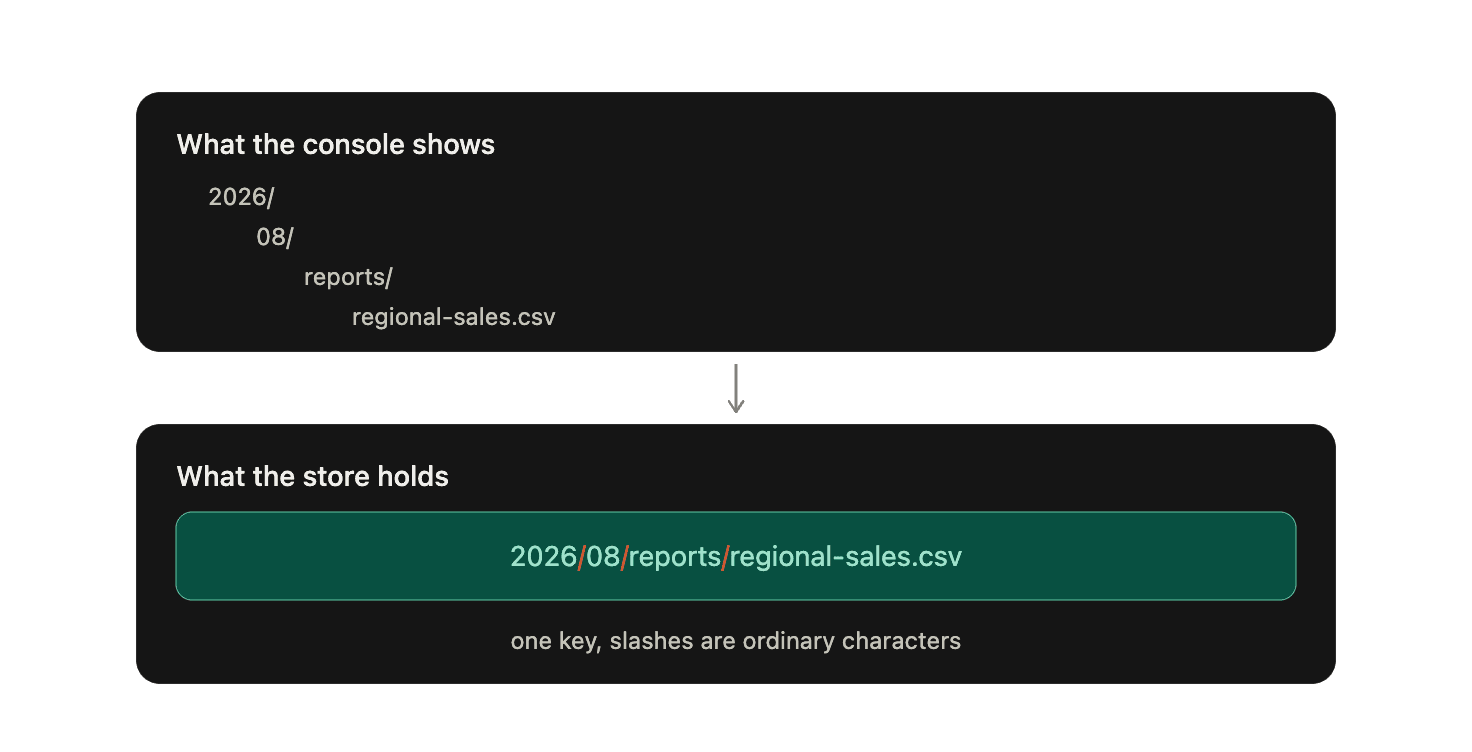
Moving a/file.csv to b/file.csv is a copy followed by a delete of the original, and on a large object that takes time and has a chance of failing. Past five gigabytes the single-request server-side copy is not even available — you need a multipart copy, so the rename becomes a sequence of requests with parts that can fail individually.
Objects Are Immutable
You do not edit an object. You replace it.
There is no seek, no write at offset, no truncate. To change one line in a 200 MB CSV, you download 200 MB, change the line, and upload 200 MB.
This means two writers replacing the same key do not conflict, and neither of them is told anything. Last write wins, with no defined ordering between them, so you cannot even say which one that will be.
There is no row lock here, but there is a compare-and-swap. S3 has supported conditional writes since late 2024: If-None-Match: * on a PUT fails with a 412 if the key already exists, which gives you create-if-absent, and If-Match with an ETag fails unless the current object is still the one you read, which gives you the read-modify-write loop you would otherwise have to build outside the store. It is per-key and it is recent enough that plenty of code and writing assumes it does not exist. Reach for it before you invent a lock in a database. The older options — make the key unique per write, or coordinate elsewhere — are still fine, just no longer the only ones.
Lifecycle Rules
Versioning, multipart uploads and storage tiers all depend on lifecycle rules, so they come first.
A lifecycle rule is a standing instruction attached to a bucket: for objects matching a prefix or a tag, once they reach a given age, do something — delete them, move them to a cheaper tier, or clean up state that is not a normal object at all. The store evaluates it on its own schedule. No code of yours, no cron job.
Non-current versions, incomplete multipart uploads and abandoned uploads under a staging prefix are all handled this way, and all three cost money silently until a rule exists.
Versioning, and What Delete Actually Does
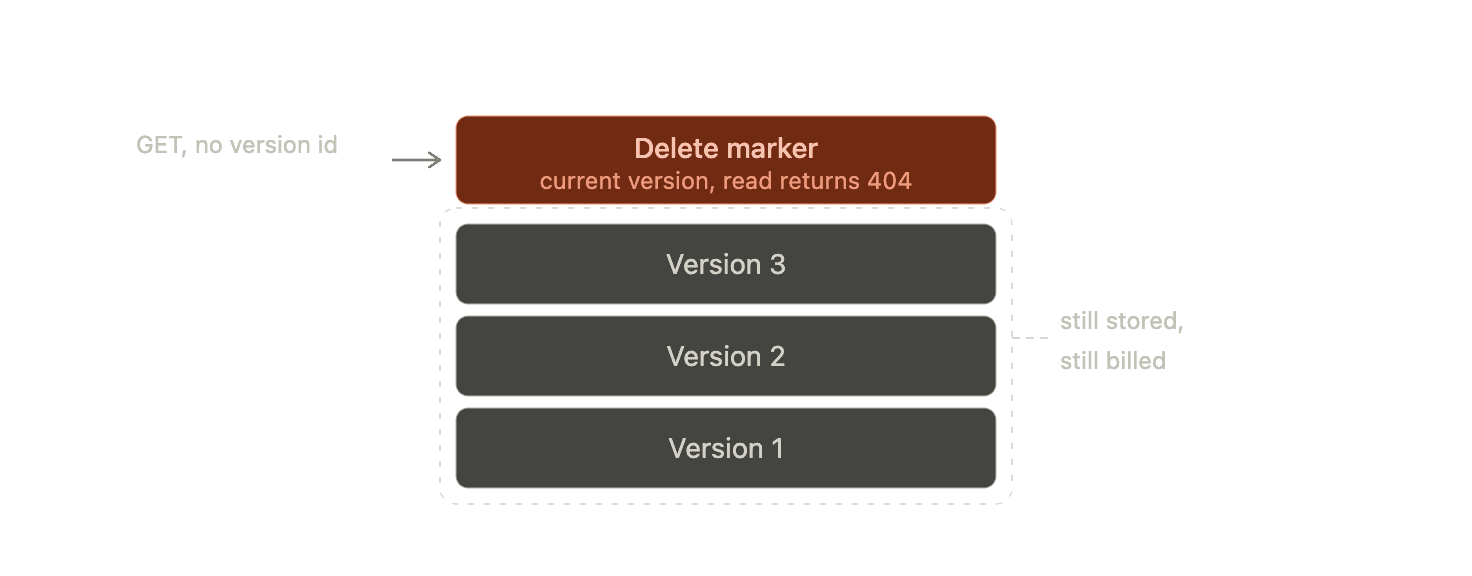
Enabling versioning on a bucket changes the write semantics. A write no longer replaces the previous object; it creates a new version and the previous one becomes non-current. Reads without a version id get the current one.
This gives you a history for a key that is otherwise overwritten in place, and it makes accidental deletion recoverable, which is usually why it gets turned on.
Then deletion changes meaning. A delete on a versioned bucket does not delete anything. It writes a delete marker, which becomes the current version, so reads now return a 404 while every previous version is still sitting there and still being billed.
Nothing about your application behaviour will tell you this is happening. The bill will.
Delete markers are themselves billable entries and they show up in version listings. Delete a few million objects on a versioned bucket and you have a few million markers with no object data behind them, slowing every listing and costing money for storing nothing.
If you turn on versioning, turn on a lifecycle rule to expire non-current versions in the same sitting. Thirty days is a reasonable default.
One last property of the object model: S3 has been strongly read-after-write consistent since 2020. A successful write is immediately visible to a subsequent read, including overwrites and deletes, and a listing reflects it too.
Getting Bytes In and Out
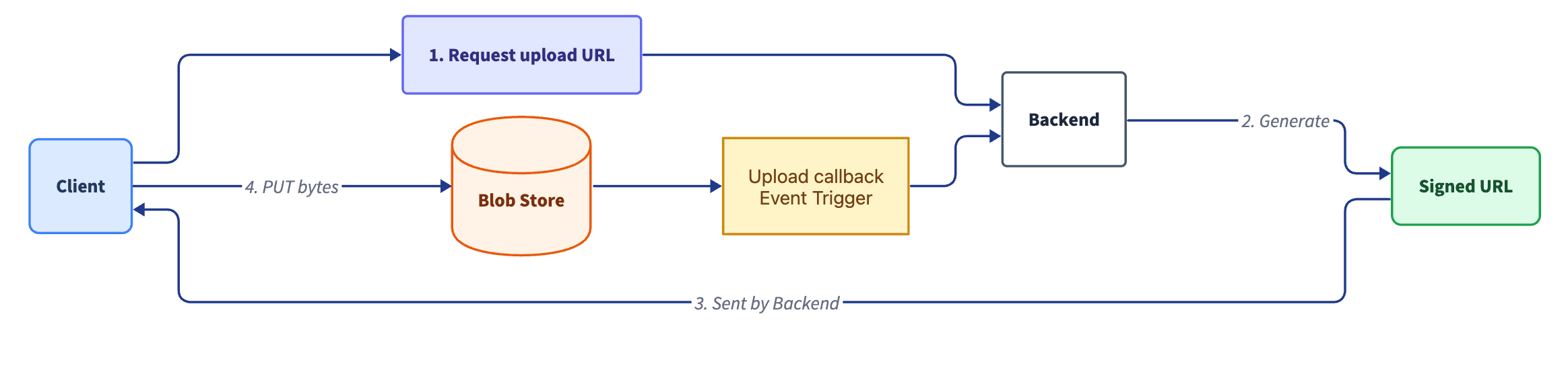
Presigned URLs allow clients to upload or download files directly from the blob store for a limited period, without routing the entire file through your backend. Your application signs a URL, the client uses it, and the bytes never touch your servers.
Your application servers are out of the byte path entirely, so a 2 GB upload does not occupy a request handler for four minutes.
A Presigned PUT Authorises More Than You Think
A presigned PUT says: whoever holds this URL may write this key until it expires, subject to whatever you signed into it.
Any header listed in SignedHeaders must be presented by the client with exactly the value you signed, so signing Content-Type makes the type binding and signing Content-Length pins the body to one exact byte count. What you cannot express is a range. You can require the body to be exactly 4,193,921 bytes; you cannot require it to be under 10 MB. Sign neither, and the holder can send you five gigabytes, and it will succeed, and you will be billed for it.
For browser uploads where you need actual limits, consider an S3 POST policy. You build a policy document, sign it, and the browser submits a form against it. The policy can constrain the content length range, the content type, and the key prefix, and the constraints are part of what was signed, so a client cannot exceed them.
Expiry has two limits of its own. A SigV4 presigned URL cannot be valid for longer than seven days, whatever you pass in. And it cannot outlive the credential that signed it, so a URL signed inside a Lambda by a role session with an hour left on it expires in an hour regardless of the seven days you asked for.
One more thing that catches browser uploads: the bucket needs a CORS configuration. A presigned PUT issued from your page is a cross-origin request, so the browser sends a preflight OPTIONS first, and a bucket with no CORS rules rejects it. The upload fails before a single byte is sent, and the only signal is a console error, not a status code from your backend. Allow the origin, the PUT method, and any headers you signed — and expose ETag if the client needs it to complete a multipart upload.
Multipart Upload
Above a few hundred megabytes you do not send one request.
Multipart upload splits the object into parts, uploads them in parallel, and completes with a manifest that tells the store to assemble them. Two good things happen. Parallelism gets you throughput that a single stream cannot, and a failed part is retried on its own rather than restarting a 4 GB transfer from zero.
But there is a caveat. An upload that is initiated and never completed leaves its parts behind. They are stored, they are billed, and they do not appear in a normal object listing, so the bucket looks empty and costs money.
The ETag also stops being what you expect. For a single-part upload it is the MD5 of the object, and plenty of integrity checks are written against that. For a multipart upload it is a hash of the part hashes with a -<part count> suffix, so comparing it against an MD5 of your local file fails for reasons that have nothing to do with corruption. Use the store's own checksum support instead — on S3, a x-amz-checksum-* algorithm — if you need end-to-end verification.
The fix for abandoned uploads is a lifecycle rule to abort incomplete multipart uploads after a few days. It is one of those settings that should simply always be on, in every bucket, from the day it is created.
Range Requests
A client can ask for part of an object with a Range header, and get back just those bytes.
It is how a video player seeks to the middle of a single video file without downloading everything that comes before it, how a download resumes after a dropped connection, and how a query engine reads three columns out of a two-hundred-column Parquet file.
The Pointer and the Orphan
Sending bytes straight from the client to the store is what makes the bookkeeping hard. Your backend is not in the byte path, so it learns that an upload happened from a callback, or an event, or not at all.
So the primary database never holds the file itself. It holds a reference to it, such as an object key, along with relevant metadata.
That metadata typically includes:
- File name
- File size
- Content type
- Owner
- Upload timestamp
- Access permissions
- Processing status
- Checksums
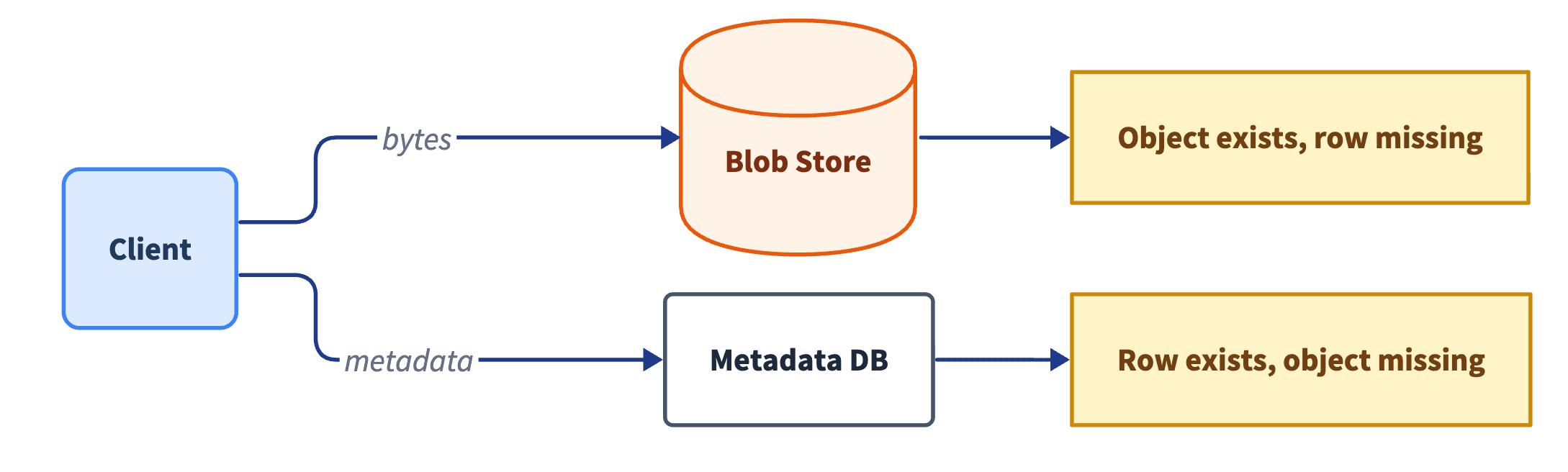
Which means every upload is two writes to two different systems, with no transaction across them.
The bytes go to the blob store. The row goes to the database. There are two ways to end up inconsistent.
The object exists and the row does not. Nothing in your application has a reference to those bytes. Nothing will ever read them, nothing will ever delete them, and you will pay for them every month until somebody goes looking. This is an orphaned object.
The row exists and the object does not. The upload failed, or the user closed the tab halfway. Your database now has a record that looks complete and a key that returns a 404, and you find out when a user clicks download.
Order the writes, track the state, and reconcile. You generally want all three.
Order the writes so the cheaper failure is the likely one. Write the object first, then the row. An orphan costs storage. A dangling pointer costs a user-visible error.
Give the row a status. Insert it as pending before the upload begins, promote it to ready only once the object is confirmed. Anything left pending past a threshold is a failed upload, and you can clean it up on a schedule instead of guessing.
Reconcile. A periodic job that lists the bucket, diffs it against the table, and reports what only exists on one side. You will find discrepancies; this is normal.
For abandoned uploads specifically, a lifecycle rule on an incoming/ prefix handles it with no code at all. Objects that were never promoted expire on their own.
Storage Classes
Storage is not one price. Access tiers trade retrieval cost and latency against storage cost.
Roughly, the ladder runs from standard storage, through infrequent-access tiers that cost less to store and more to read, down to archival tiers. In the deepest tiers a retrieval is a request you submit and wait on, with a latency in minutes or hours — though the ladder is no longer that clean, since Glacier Instant Retrieval gives millisecond access at close to archival storage pricing.
Lifecycle rules move objects along that ladder by age or by prefix, and expire them at the end. The common shape is something like: keep exports in standard for 30 days, move them to infrequent access, archive at 90, delete at 365. Once configured, the rule applies automatically.
The traps are in the billing rather than the behaviour.
Minimum storage durations. Cheaper tiers bill for a minimum period whether or not the object survives that long. Thirty days for infrequent access, ninety or a hundred and eighty for archival tiers. Transition a pile of objects that get deleted after a week and you have paid more than if you had left them where they were.
Minimum billable object size. The IA tiers also bill a minimum of 128 KB per object regardless of its real size. Move a million 4 KB files to infrequent access and you are billed as though each one were 128 KB, which is thirty-two times the number you were expecting. Together with the minimum duration, this is why moving a pile of small files to a cheaper tier can make the supposedly cheaper tier more expensive.
Archival retrieval is an operation, not a read. It has a latency and a per-request price. Anything on a user-facing path cannot live in a deep archival tier, no matter how good the storage number looks, and an accidental bulk restore is an expensive afternoon.
Blob Stores as Event Sources
A file upload to a blob store can trigger an event that starts downstream processing. For example:
- Uploading an image could trigger thumbnail generation.
- Uploading a CSV could start a data-validation job.
- Uploading a video could trigger a transcoding pipeline.
Notifications Are At Least Once
S3 event notifications are delivered at least once. The same upload can invoke your handler twice.
So the handler needs to be idempotent. On a versioned bucket, the object key plus version id is a good deduplication key, because it is stable across redeliveries. On an unversioned bucket there is no version id, and the field for this is sequencer — a hex string that increases across successive events for the same key.
Ordering is not promised either. A create and a subsequent delete on the same key can arrive in either order, which means a handler that acts on the create after processing the delete will happily recreate derived state for an object that no longer exists. sequencer is what lets you catch that: compare it against the last value you processed for that key and discard anything older. It gives you per-key ordering and nothing across keys. Beyond that, the handler has to check the current state of the object rather than trusting the event to be current.
Recursive Notifications
You configure a notification on object creation. The function processes the object and writes its output — a thumbnail, a converted file, a validated copy — back to the same bucket.
That write is an object creation. The notification fires. The function runs on its own output.
Whether it terminates depends on what the function writes. If the thumbnail does not itself produce a thumbnail, the loop stops after one extra round. If it does, it never stops, and nothing in the loop is broken enough to raise an alarm — every invocation succeeds, every write succeeds, and it can run all weekend that way.
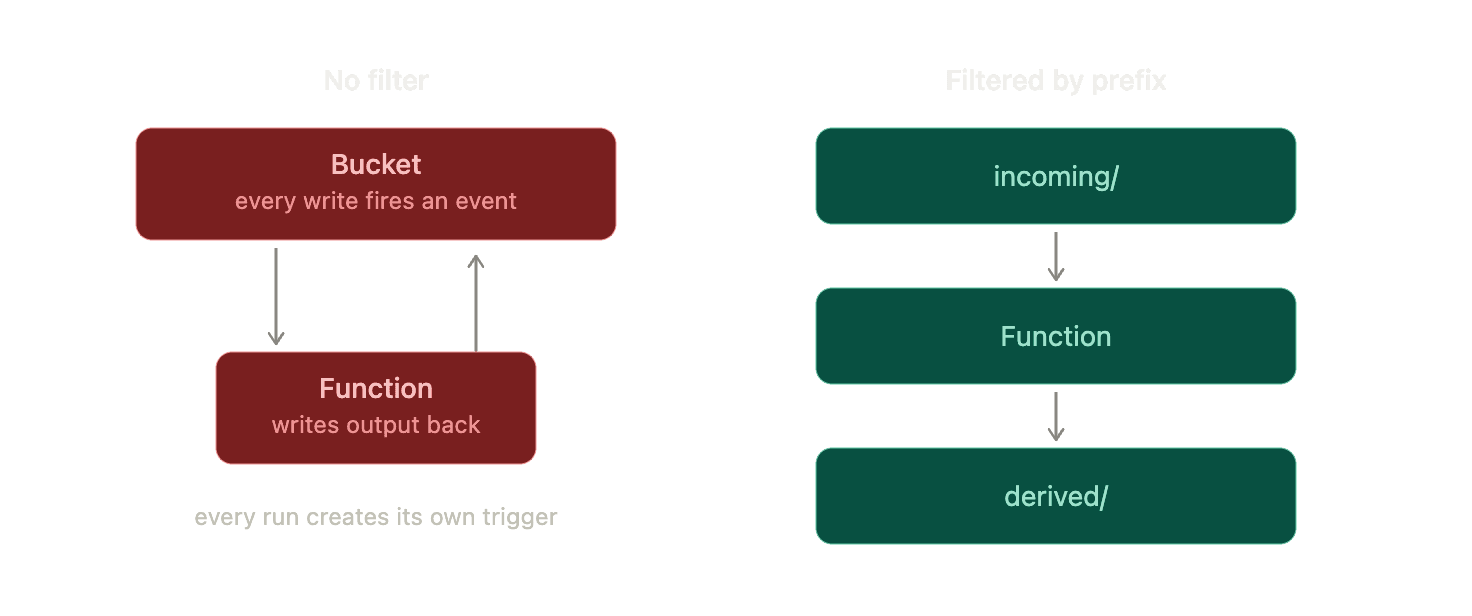
Filter the notification by prefix, so only incoming/ triggers the function and it writes to derived/. Better still, use a separate output bucket, which cannot be broken by a later configuration change the way a prefix filter can.
File Formats and Access Patterns
A file format is a decision about read cost, not just an encoding.
Tabular Data
For tabular data, common formats include CSV, TSV and XLSX. These are what you get when users upload data manually, and what you produce for simple import and export workflows. They are row-oriented, they are text, and reading one column means reading every byte.
For analytics-heavy workloads, Parquet is usually the right answer, and it is not simply a transposed CSV. A short version follows; Parquet gets fuller treatment in the Architecting a Data System series.
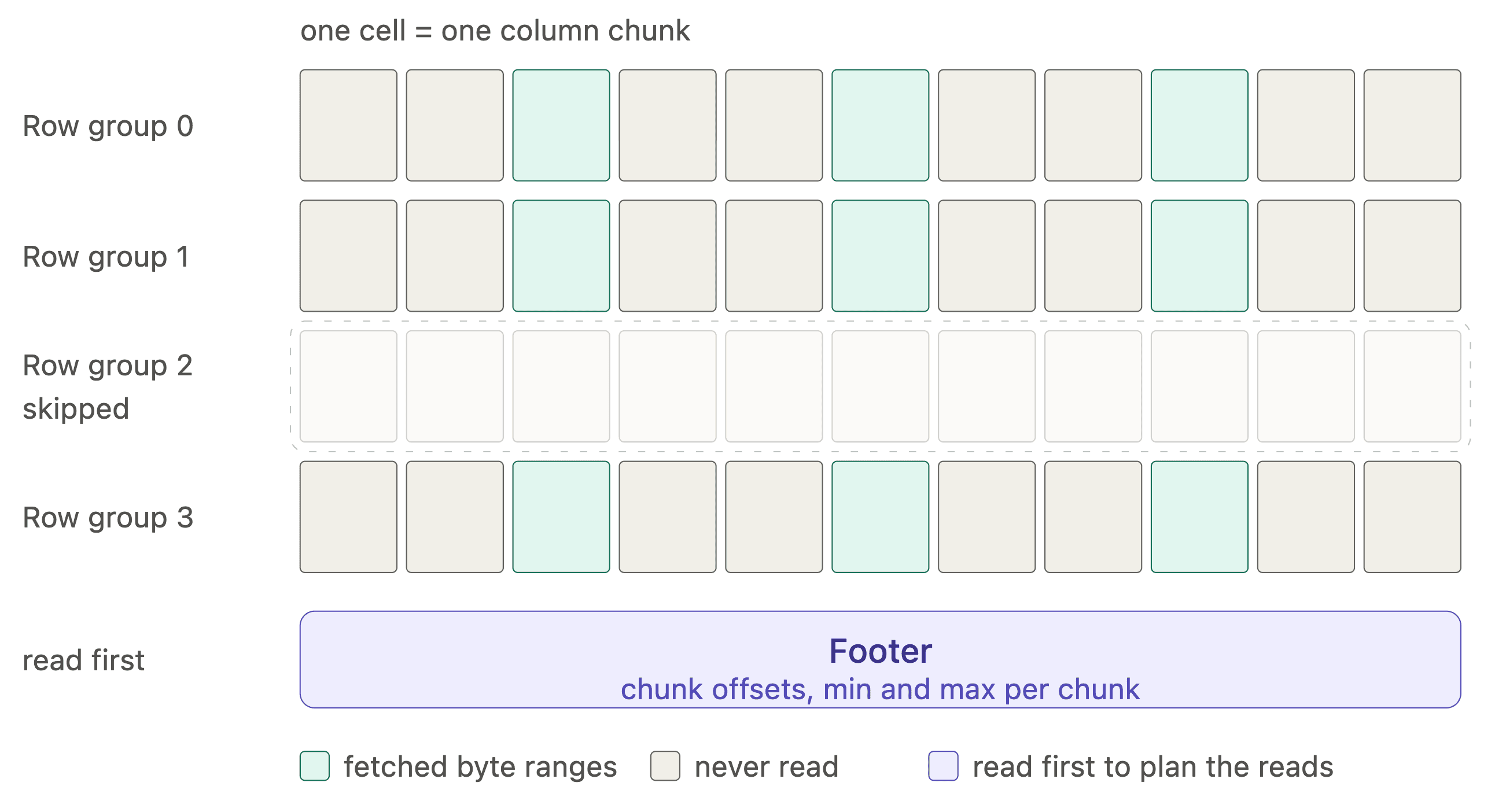
A Parquet file is divided into row groups, and within each row group the data for each column is stored contiguously as its own chunk. A footer at the end of the file records where every one of those chunks is, along with statistics about them.
So a reader fetches the footer, works out which byte ranges it needs, and range-requests exactly those. Reading three columns out of two hundred costs three columns. The statistics let it skip entire row groups whose minimum and maximum values rule out a match, so a filtered query may not read most of the file at all.
Parquet on a blob store works because the store honours Range requests, so the engine reads only the byte ranges it needs.
JSON and Text
For some use cases, JSON or plain text is sufficient. JSON is commonly used for structured payloads, configuration snapshots, and API exports. Text files are useful for simple logs, transcripts, or raw content.
For logs specifically, the format that gets stored is usually newline-delimited JSON (JSONL) rather than a JSON array. One object per line means a reader can process it a line at a time without holding the whole file in memory, and a large file can be split at line boundaries and processed in parallel.
Images
JPEG for photographs, PNG when you need lossless or transparency, WebP when the goal is fewer bytes on a page. The codec is rarely the decision that matters, though.
You are not storing one image. You are storing the original and generating derivatives from it — thumbnail, display size, WebP variant — because you cannot know today which sizes you will need next year.
Audio and Video
MP3 and MP4 cover most of it. The structural decision is streaming.
For video, systems generally use HLS. Rather than serving one large file, the video is split into chunks, usually generated at several resolutions or bitrates, and the player adapts as the network changes — faster starts, smoother playback, and no stall when bandwidth drops.
An HLS stream is not one kind of file, it is two. There is a manifest listing the available renditions and segments, and there are the segments themselves.
The segments are immutable. Once written, segment-00412.ts is that content forever, and it can be cached for as long as anything can be cached.
The manifest is not. For live content it changes every few seconds, and caching it hard means players never learn that new segments exist.
Static Site Hosting
A blob store can also be used to host static sites.
For example, AWS S3 allows you to configure a bucket for static website hosting and serve files such as HTML, CSS, JavaScript, images, fonts and other static assets.
This works well for sites where the content is generated ahead of time and does not require server-side rendering for every request. Common examples include:
- Documentation sites
- Landing pages
- Personal blogs
- Admin dashboards
- Frontends built using frameworks that export static assets
In this setup, the blob store acts as the origin for the site. The browser requests files such as index.html, styles.css or app.js, and the blob store returns those objects directly.
A few configuration details:
- Set the correct content types for files. An HTML file served as
application/octet-streamdownloads instead of rendering. - Configure CORS policies when assets are accessed from another domain. Fonts are the usual thing that breaks first.
- Make certain objects publicly readable, or serve them securely through a CDN.
Then there is caching.
Two Files, Opposite Policies
A built frontend contains two classes of file and they need opposite cache headers.
Hashed assets are immutable by construction. app.a41f9c.js contains exactly one version of your code, and if the code changes the filename changes. There is no scenario in which a browser should ever recheck it.
Cache-Control: public, max-age=31536000, immutableThe entry point is not. index.html keeps the same name across every deploy and its whole job is to tell the browser which hashed assets to load.
Cache-Control: no-cacheGet these the right way round and a repeat visitor loads your site from local cache with one conditional request for the HTML. Get them backwards and here is what happens.
You deploy. The new index.html references app.b72e04.js. A returning user has the old index.html cached with a one-year max-age, so the browser does not ask for it, and the old HTML asks for app.a41f9c.js. If your deploy prunes old assets, and most do, that object is gone. The browser gets a 404 for the only script on the page and the user gets a blank screen.
Nothing in your monitoring fires. The deploy succeeded, the origin is healthy, and the affected users are precisely the ones who have visited before.
Bucket Endpoint or CDN
Blob stores generally expose two ways to serve a site, and they behave differently. The website endpoint gives you index and error document handling and redirect rules, but is plain HTTP. The plain object endpoint supports HTTPS but has no notion of an index document.
Which is one of several reasons the usual arrangement is neither. You keep the bucket private, put a CDN in front, and let the CDN be the only thing that can read it. The CDN handles TLS, index documents, error responses and caching, and the bucket can remain a private object store.
Content Delivery Networks
A Content Delivery Network, or CDN, is a globally distributed network of servers used to serve content closer to users.
CDNs are commonly used for static assets such as images, JavaScript bundles, CSS files, fonts, videos and downloadable files.
The main benefit is reduced latency. Instead of every user fetching assets from your origin server, CDN edge servers cache those assets in different regions. When a user requests an asset, it can be served from a nearby edge location, improving response times and reducing the load on your infrastructure.
Since static files are easy to cache, this setup can scale very well and is often much cheaper than running application servers for the same traffic. The saving is in two places: CDN egress is billed at a lower rate than origin egress, and a cached object is not an origin fetch at all, so you pay neither the bytes nor the request.
It also introduces failure modes.
The Cache Key
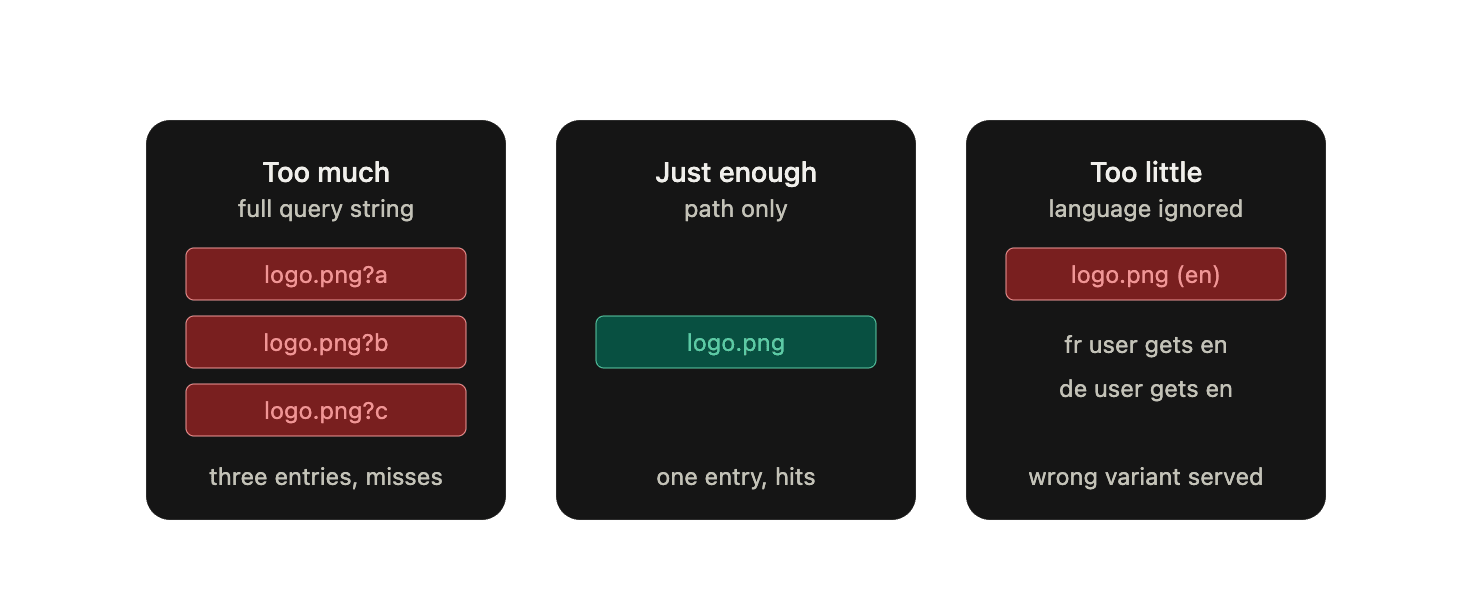
The cache key is what the CDN uses to decide whether two requests are the same request. By default it is the host and the path. Beyond that, you configure it: which query string parameters count, which headers count, which cookies count.
Two things that can go wrong.
Include too much and your hit rate collapses. Put the full query string in the key and logo.png?utm_source=twitter is a different object from logo.png?utm_source=email, which is a different object from logo.png. You are now caching one image under an unbounded number of keys, and most requests miss and go to origin. The CDN is doing nothing except adding a hop.
Include too little and you serve the wrong thing. If a response varies by Accept-Language but the cache key does not include it, the first request populates the cache and everybody afterwards gets that user's language. Same for Accept-Encoding, same for any response that varies by a header you did not tell the CDN about. The problem can be hard to detect because requests from the same client still appear correct.
The rule of thumb is to include the smallest set of inputs that the response genuinely varies on, and to strip everything else at the edge rather than letting it into the key by default.
Cache Invalidation
Once an asset is cached at the edge, updating or removing it is not immediate. There are two strategies for this, usually presented as though they were equivalent when they are not.
Explicit invalidation tells the CDN to drop an object. It is slow, it is often metered past a free allowance, and it propagates across edges over some period rather than instantly.
Versioned URLs avoid the problem instead of solving it. A hashed filename like app.b72e04.js is a name no edge has ever seen, so there is nothing to invalidate, the old object expires on its own schedule, and nobody waits for it.
Which gives the rule: version everything you can, and invalidate only the handful of things you cannot. In a typical static site that handful is index.html and possibly a manifest, and no-cache on those means you do not need to invalidate them.
A CDN and a browser are different caches and usually want different answers, which is what the two remaining headers are for. s-maxage sets the lifetime for shared caches and max-age for the browser, so you can hold a long CDN lifetime alongside a short browser one, invalidate centrally and have it take effect rather than waiting for every browser in the world to expire its own copy. stale-while-revalidate lets a cache serve the stale object immediately and refresh it behind the request, so the user gets a fast response and the next user gets the fresh one — for most content a better trade than making someone wait for the origin.
HLS segments are versioned URLs by construction: segment-00412.ts is a name that will never hold different bytes, so it takes a year-long TTL and never needs invalidating at all. The manifest is the opposite — same URL, new contents every few seconds — and no CDN will invalidate on that cadence. It wants a TTL in single-digit seconds, with stale-while-revalidate so a player is never blocked on the origin for it. One bucket, one distribution, two cache policies split by path.
Cold Caches and the Thundering Herd
"The CDN reduces origin load" is true in steady state. Cold caches are where the origin-load benefit can temporarily disappear.
A new asset, or a newly popular one, is a miss at every edge. If ten thousand people request it in the same second at the same edge, the naive behaviour is ten thousand origin fetches for one object.
Request collapsing at the edge folds concurrent misses for the same cache key into a single origin request and serves all of them from the one response. Origin shield adds a mid-tier cache between the edges and your origin, so a global miss becomes one request from each shield rather than one from each edge.
Negative responses get cached too. A misconfigured origin that returns a 404 or a 500 with a long TTL will have that error cached at the edge and served long after the origin was fixed. Keep the TTL on error responses short, in the range of seconds.
Access Control
Anything private must not land in a shared cache: authenticated pages, per-user responses, and anything that varies by permission.
Signed URLs authorise one object for a window. Good for a one-off download link, signature in query string.
Signed cookies authorise a set of paths, which is what you want when a page pulls fifty assets that all need the same authorisation. One cookie, fifty cacheable requests.
Lock the origin. This is the one that gets missed. If your bucket is publicly readable and the CDN is merely the recommended way to reach it, then every rule you configured at the edge — signing, geo restrictions, header stripping, WAF — can be bypassed entirely. Anyone who works out the bucket URL addresses it directly and bypasses all of it.
So the bucket should be private, with the CDN holding a credential that lets it read and nobody else having one. On CloudFront that is an origin access control on the distribution paired with a bucket policy that grants only that distribution.
Conclusion
A blob store is a simple thing that ends up carrying far more of the system than its interface suggests. It holds the data your database should not, it serves bytes far more cheaply than your application can, and a great deal of your system's behaviour follows from properties it has that a filesystem does not.
We looked at the object model, why immutability changes how you design around it, and the orphan problem that comes from writing to two systems at once. Then at presigned uploads, multipart, and the settings that keep them from costing you money quietly; at what file formats decide about read cost; and at static hosting and CDNs, where the cache key and the cache headers on two files do more damage than anything else in this part.
These components may appear to solve different problems, but they frequently work together. A file can be uploaded to a blob store, generate an event, enter a processing flow, be transformed by workers, and finally be distributed through a CDN.
Next up, we will bring many of these ideas together and walk through a practical system design overview for a video-streaming platform.